

Intro#
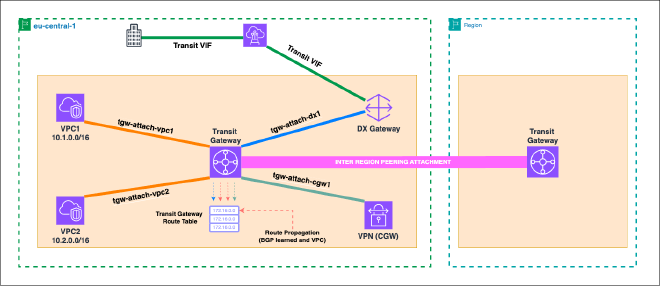
AWS transit gateway is a managed service introduced in 2018, which provides connectivity and routing between.
- Multiple VPCs (with easy configuration and possibility to add new VPCs without configuring new gateways or peering)
- Across multiple regions
- Corporate data centers (customer site) using Customer Gateways
- Direct Connect
Typical Architecture#
Site to Site VPN#
[[Site to Site VPN]] can also be achieved using transit gateway instead of using Virtual Private Gateway. The VPG can only be attached to one VPC, whereas the transit gateway can connect the customer site to multiple VPCs, more over it also provides connectivity between those multiple VPCs without needing and extra [[VPC Peering]]. AWS transit gateway can act at a hub connecting multiple VPCs, Site-to-site VPN, Direct connect and other regions across different AWS accounts (using transit gateway peering)
Example Overview#
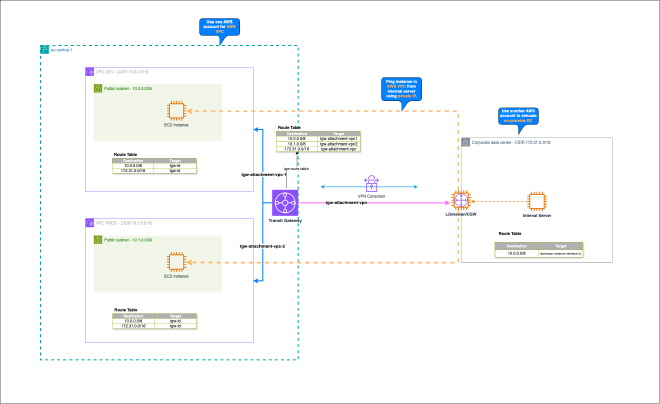
The above example covers, 2 scenarios of the Transit Gateway usage
- Connectivity between 2 VPCs
- Connectivity between VPCs and Site-to-site connectivity involving both the VPCs
Terraform:#
https://github.com/rangalo/aws-infra-tf/tree/main/hardik/transit-gw
resource "aws_ec2_transit_gateway" "eu-central-tgw" {
  amazon_side_asn                 = var.aws_asn
  default_route_table_association = "enable"
  default_route_table_propagation = "enable"

  tags = {
    terraform = "true"
    Name      = "eu-central-tgw"
  }
}

resource "aws_ec2_transit_gateway_vpc_attachment" "dev-vpc-tgw-attachment" {
  subnet_ids         = [for s in module.networking1.private_subnets : s.id]
  transit_gateway_id = aws_ec2_transit_gateway.eu-central-tgw.id
  vpc_id             = module.networking1.vpc_id
}

resource "aws_ec2_transit_gateway_vpc_attachment" "prod-vpc-tgw-attachment" {
  subnet_ids         = [for s in module.networking2.private_subnets : s.id]
  transit_gateway_id = aws_ec2_transit_gateway.eu-central-tgw.id
  vpc_id             = module.networking2.vpc_id
}
AWS side setup#
VPC 1 DEV - CIDR 10.0.0.0/16
VPC 2 PROD - CIDR 10.1.0.0/16
Customer GW having public IP of the libreswan instance on another AWS account which acts as a customer data center (site)
Transit gateway
- Transit gateway attachment to vpc1 for each subnet in every AZ (availability zone) let’s call them tgw-attaachment-vpc1, tgw-attachment-vpc-2
- VPN Connection configured with CGW id and TGW id having static routing. This will automatically create a tgw attachment, for now, we call it, tgw-attachment-vpn
Routing It is important to understand routing with transit gateways.
The tgw comes with a default route table which is associated with all the attachments and also propagated. As, we are using static routes in our example, we need to add the static route for the vpn attachment to the default tgw route table.
| Destination CIDR | Target | Automatically added? |
|---|---|---|
| 10.0.0.0/16 | tgw-attachment-vpc-1 | Yes |
| 10.1.0.0/16 | tgw-attachment-vpc-2 | Yes |
| 172.31.0.0/16 | tgw-attachment-vpn | No |
Each VPC will also need backwards route to tgw. Route table of each subnet (which needs the connectivity), should have the following routes in addition.
| Destination CIDR | Target |
|---|---|
| 10.0.0.0/8 | tgw_id |
| 172.31.0.0/16 | tgw_id |
Customer side (site) setup#
- Using default VPC - CIDR 172.31.0.0/16
- EC2 instance called openswan (as openswan is not available we will install libreswan) which has libreswan installed using user-data.
- Another EC2 instance to test the connectivity using ping.
- Routing: The default route table of the default vpc will require route to forward all the traffic intended for the AWS network, both the VPCs to the openswan instance
| Destination CIDR | Target |
|---|---|
| 10.0.0.0/8 | default_network_interrface_of_openswan_ec2_instance |
Setup the Site (vpn client with libreswan)#
Same as desribed in [[Site to Site VPN]]
Fine-tuning the connectivity#
The example above provides default connectivity to all the involved networks vpc1, vpc2 and vpn. Providing separate route-table for each attachment, very fine-tuned connectivity can be achieved e.g. isolating certain networks (e.v. vpc2).
Moreover, the access to public internet can be routed through a specific VPC for reducing the number of NAT Gateways and as an effect reducing the cost. Example: https://aws.plainenglish.io/aws-transit-gateway-101-how-it-works-and-when-to-use-it-65c4369bcdb6